Let families book tours from your site
Available on every plan
Rolling out: if you don't see this yet, it isn't on for your school yet.
Set your tour hours, block dates, accept a tour request, and see what the Free plan's limit of 4 bookings a month means.
When you set tour hours, families can pick one of your open times from your website instead of waiting for a reply. Without hours, they send a request and you choose the time. Only a school admin can set this up, and it's on the web.
Set your tour hours
The quick way: open Calendar and choose Set tour hours.
- Turn on the days you give tours, Monday to Friday.
- Set when tours start and end each day, how long each one runs, and the most you'll give in a week.
- Choose Save tour hours.
A new setup starts with Tuesday and Thursday from 10:30 to 11:30 am, 40-minute tours, and no more than 3 a week. It needs at least one day on, and the end time must be after the start.
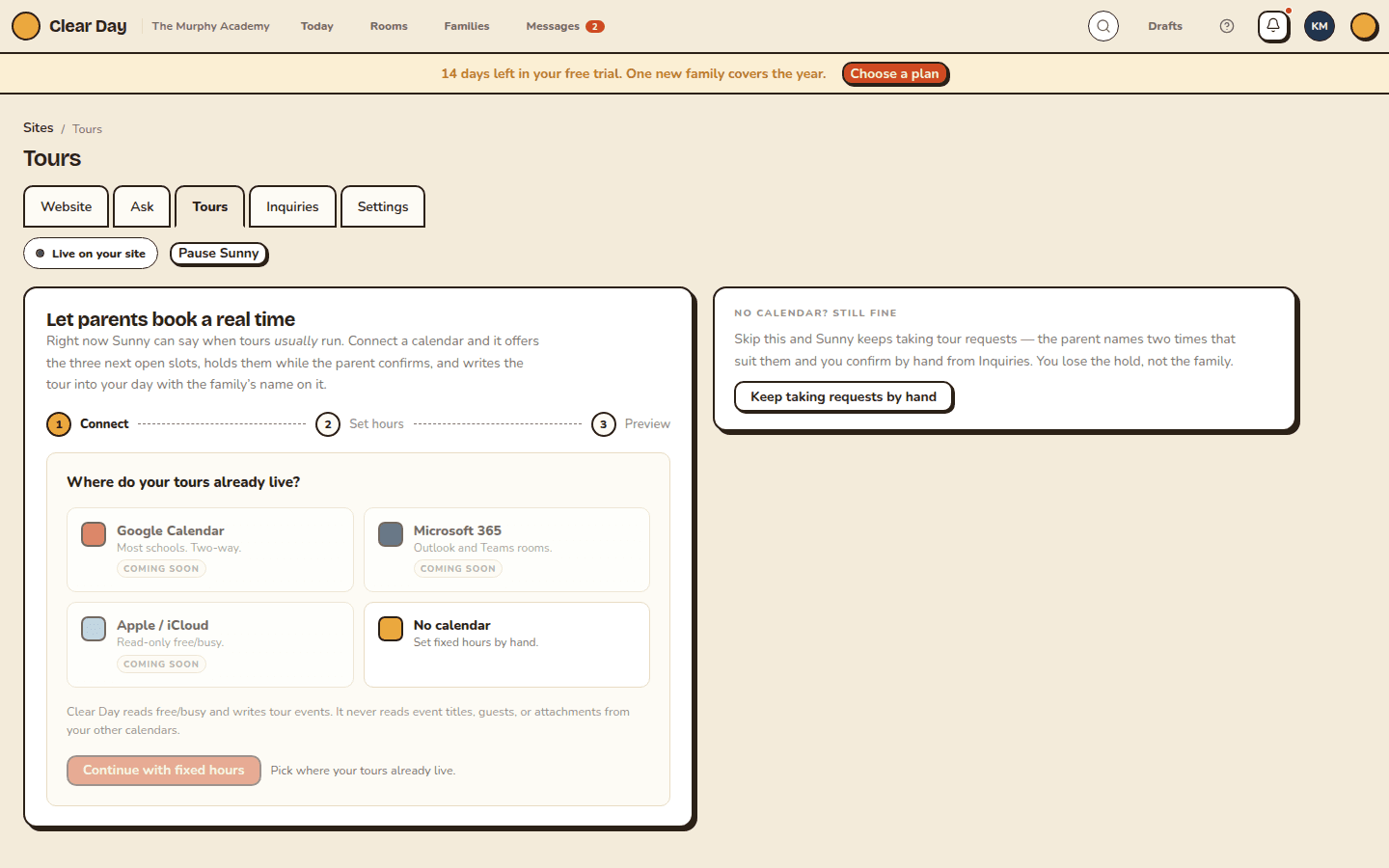
For more control, choose More options in Tours, or open Website, then the Tours tab. The first time, "Let parents book a real time" walks you through Connect, Set hours and Preview. Google, Microsoft and Apple calendars say "Coming soon," so choose No calendar and then Continue with fixed hours. Add a window, a buffer after each tour, and a host, then Preview what parents see and Publish tour booking.
Later, the Tour availability card shows Fixed hours (no calendar). You can edit each window, the tour length, the buffer, Cap / week and the Host, which must be a school admin. Choose Save availability. What parents see next lists the real open times, so you can check them before families do.
Block dates
Under Blackout dates, choose a date, add an end date if it runs longer, and give it a reason like "Thanksgiving." Choose Add blackout. No one can book those days.
When a family picks a time
They pick one of your open times on your site. It arrives as a Tour requested inquiry with that time. See Your leads inbox.
- Open the inquiry on the Inquiries tab.
- Choose Accept with their time, or Pick another time.
- Choose Confirm booking if you picked another.
The tour is booked and, if you have an email for the family, they get a confirmation. If someone else took that time first, the family sees "That time was just taken. Pick another." Clear Day doesn't add the tour to an outside calendar yet, so add it to yours by hand.
No hours set? Leave it. Sunny keeps taking requests: the family names two times that suit them, and you confirm by hand.
The Free plan's limit
Free schools can book 4 tours a month. The Tours tab shows where you are, like "Free plan: 1 of 4 tours a month booked in October." At the limit it reads "All 4 tours booked in October on the Free plan," with an Unlock button. Nobody is turned away: a family can still send a tour request. Plus and up have no limit. See The Plus plan.
Related articles
- Your leads inbox
Where families who contact you through your website show up, how you're alerted, and what you can do with each inquiry on Free and Plus.
- Your enrollment assistant
What families can ask Sunny on your website, where the answers come from, and how to see gaps, set limits and try it yourself.
- Manage the school calendar
Add events and closings, tell families about a closure, set tour hours and share one calendar link with every family.
- Schedule tours and send follow-ups
Book a family's tour, write down what mattered, and send a warm follow-up a couple of days later.
- The Plus plan
What Plus adds to Free, how to buy it, and what happens if you end it.
Last updated on