Choose or change your plan
Available on every plan
Where to find the plan cards, what the buttons do, and how to check out or switch plans on the web and in the app.
The plan picker is a row of cards, one each for Plus, Run and Grow. Only a school admin can use it. In the app, a teacher who opens it is told, "Billing changes need a school admin — ask your director to choose the plan." On the web, a teacher sees "Access restricted."
Where to find it
- Trial: click Choose a plan in the banner. On the web it opens the picker. In the app it opens Plan & billing.
- After the trial: the "Your free trial has ended" page shows it, with a way to switch to Free if you'd rather not pick a plan. See Your 14-day free trial.
- Free or Plus on the web: open Billing in your navigation.
- Free or Plus in the app: open the Billing tab.
- Run in the app: open the locked Grow tab, headed "Unlock Grow," and tap See plans.
- Any school in the app: Settings, then Manage subscription, opens Plan & billing when your school has no billing account yet.
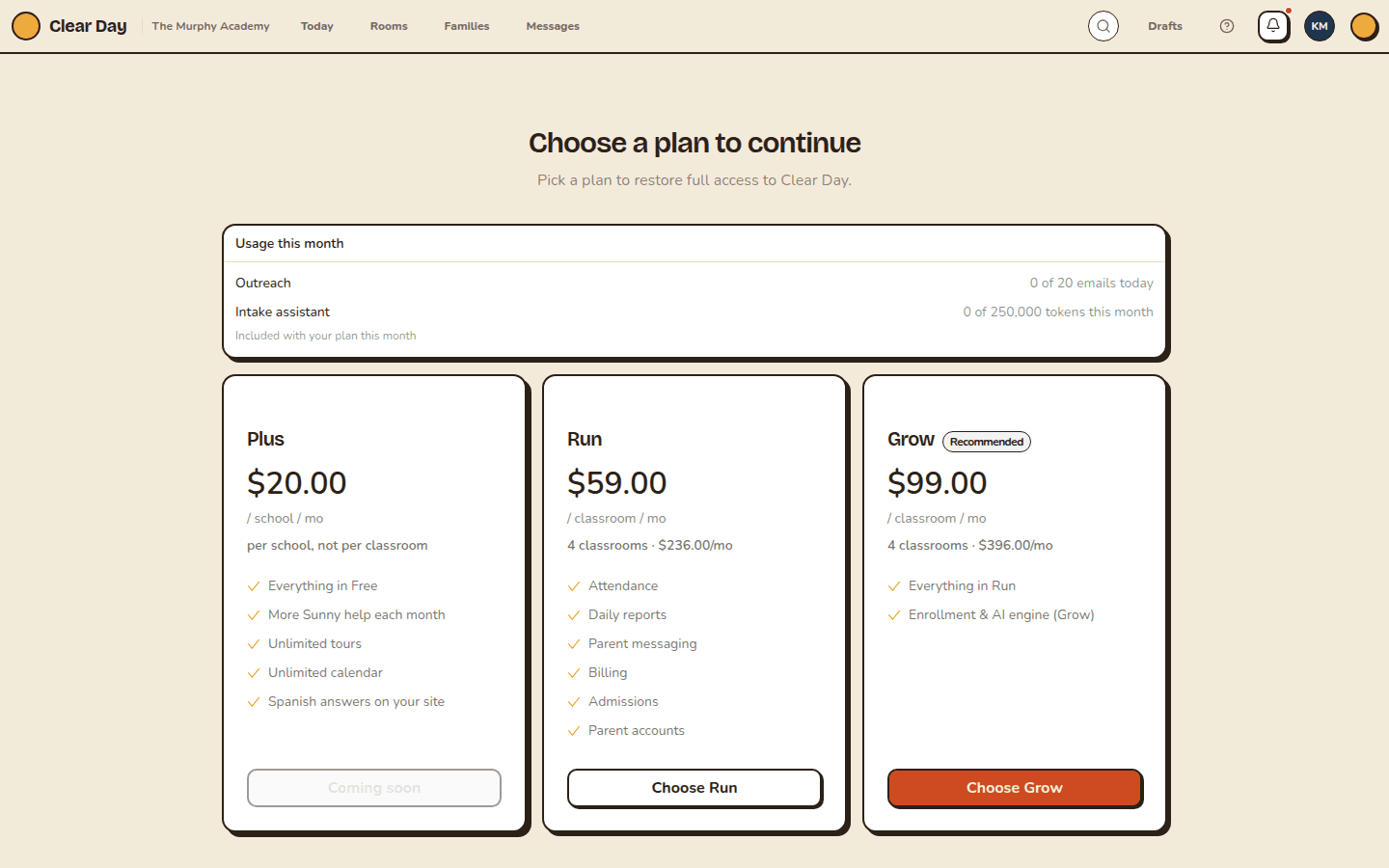
What's on the cards
Each card shows the plan's price and what it includes. Plus is "per school, not per classroom." Run and Grow show your real total under the price, for example "5 classrooms · $495/mo". See How classrooms affect your bill.
Grow carries a "Recommended" tag on the web and "Best value" in the app. Billing is monthly only.
The button on each card says one of these:
- Choose Run: start a new subscription.
- Switch to Grow: change plans on a subscription you already have.
- Current plan: this is your plan. The button is off.
- Coming soon: the plan isn't on sale for your school. Plus, Run and Grow are all sold from the picker, so if you see this on one of them, write to [email protected].
Start a subscription
- Click Choose on a card.
- Enter your card on Stripe's checkout page. In the app it opens in your phone's browser, not inside the app.
- When you're done, you return to Clear Day and your plan is live. If the app hasn't caught up, use Refresh subscription status on the gate page.
You aren't charged until you confirm in checkout. Close the page without paying and nothing changes.
Switch plans
On a live subscription, the button reads Switch to. In the app, it changes your plan in place, with no new checkout, and the new price starts right away. Stripe prorates the difference: moving up charges the rest of the period at the new rate, and moving down credits the unused part against your next bill.
Rolling out: if you don't see this yet, it isn't on for your school yet.
Moving down to Plus
You can't move from Run or Grow to Plus yourself. The web picker hides the Plus card, and the app shows "Contact support to switch." Write to [email protected].
To update your card or cancel, see Manage your plan and billing.
Related articles
- Clear Day plans at a glance
Free, Plus, Run and Grow side by side. What each plan includes, what it costs, and which school it fits.
- Your 14-day free trial
Who gets the 14-day trial, what it includes and limits, and what to expect when it ends.
- Manage your plan and billing
Update your card, see invoices, cancel or resume your plan, and what to do when a renewal fails.
- The Plus plan
What Plus adds to Free, how to buy it, and what happens if you end it.
Last updated on